Why are experts chasing the motion clarity of the CRT era?
The pursuit of CRT simulation stems from a fundamental difference in how old and new displays handle moving images. For decades, the industry has moved toward higher resolutions and thinner profiles, but in doing so, many lost the unique motion characteristics of the cathode ray tube. According to Mark Rejhon, founder of Blur Busters, individuals over the age of 40 generally retain a memory of CRT motion clarity, whereas younger generations have never experienced it.
The issue lies in how pixels transition. Mid-2000s LCD technology was notorious for slow pixel response times, creating a "ghosting" effect where moving objects left blurry trails. While modern high-refresh-rate monitors have largely solved this specific smear, they still struggle to replicate the seamless, instantaneous clarity of a CRT. The goal of modern researchers is to move beyond simple high refresh rates and recreate the specific way a CRT 'draws' an image on the screen.
How does CRT simulation technology actually work?
CRT simulation works by replicating the visual "phosphor fade" and the top-to-bottom scanning motion of an electron beam. Unlike traditional methods like Black Frame Insertion (BFI), which can feel harsh or flickery because it simply flashes a black frame between images, simulation techniques aim for a gentler transition. Mark Rejhon notes that the two primary ways to reduce motion blur are flickering frames (similar to a CRT) or increasing the frame rate.
The breakthrough lies in simulating the rolling scan. A CRT does not update the entire screen at once; an electron beam travels down the tube, illuminating phosphors that then fade naturally. By simulating this process, developers can make a game locked at 60 frames per second appear as smooth as one running at much higher frame rates, without requiring massive hardware upgrades like an RTX 5090.
The technical difference between BFI and Phosphor Fade
Black Frame Insertion (BFI) is a common technique used to reduce blur by inserting a black frame into the refresh cycle. While effective, it often results in significant flicker that can be fatiguing for the eyes. In contrast, the CRT simulation approach used by tools like ShaderBeam mimics the way light is emitted across the screen over time. Because some light is always being emitted elsewhere on the screen during a rolling scan, the experience is much less jarring than the abrupt "on-off" nature of BFI.
What role do OLED monitors play in this evolution?
OLED panels are the most promising hardware for achieving true CRT-like performance due to their ability to control individual pixels. Unlike LCDs, which rely on a backlight that can bleed light into dark areas, OLED pixels can turn completely off. This allows for the extreme contrast ratios that were a natural characteristic of CRTs. When paired with high refresh rates, OLEDs can effectively mimic the electron beam's movement.
Recent hardware developments show significant progress in this area. For example, the Asus ROG PG27AQWP-W features a 540 Hz OLED panel that provides noticeably clearer motion than older LCD technology. Some modes even allow for a 720 Hz refresh rate if the resolution is lowered to 720p. The higher the refresh rate, the more accurately the hardware can recreate the rapid scanning of a CRT beam, reducing perceived motion blur to near-zero levels.
How does ShaderBeam attempt to bridge the software gap?
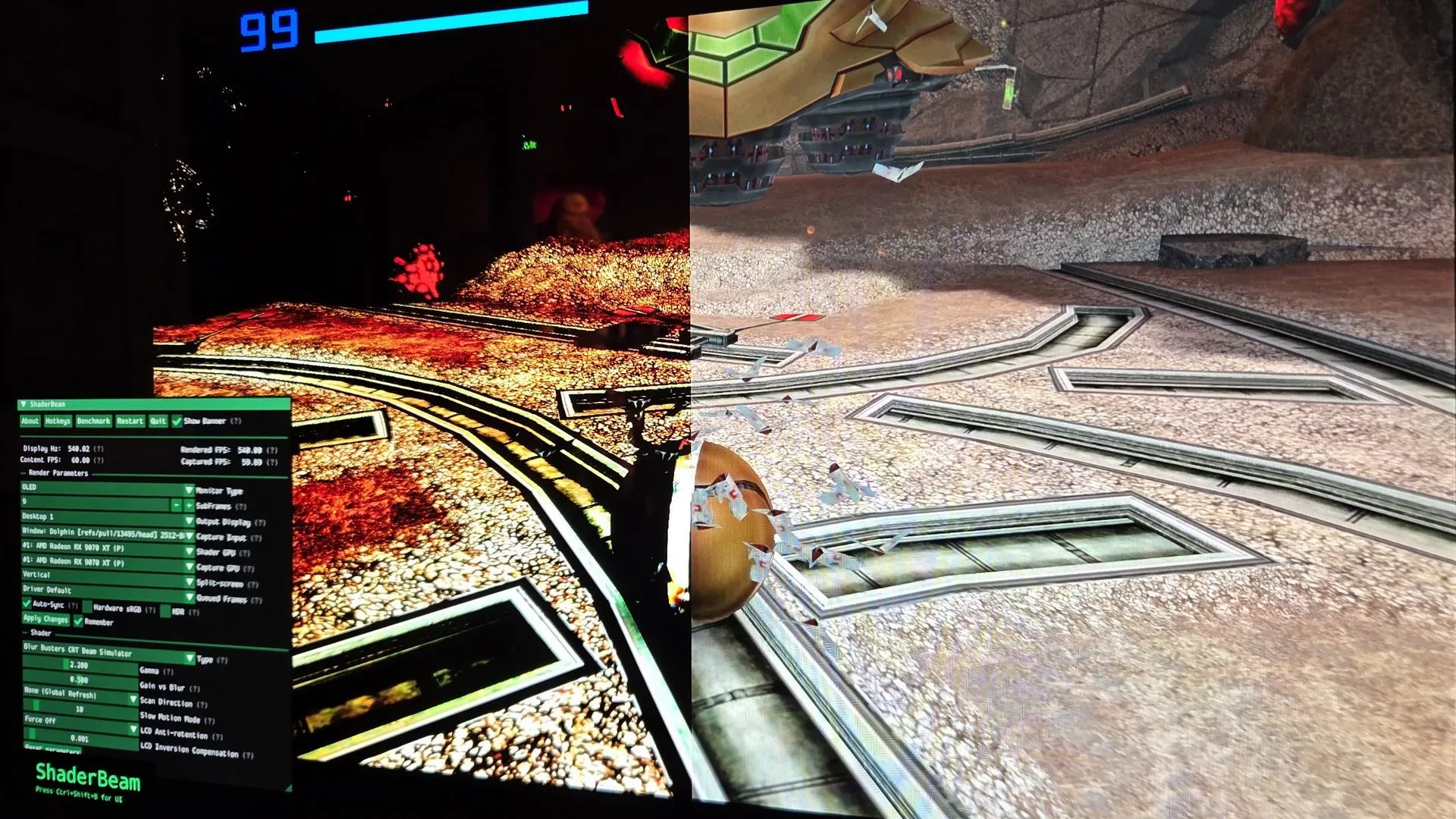
ShaderBeam is a specialized tool designed to apply CRT simulation algorithms to existing software, bypassing the need for native game support. Developed by app developer Mausimus, it acts as an overlay that uses screen capture and window transparency to inject the simulation into the rendering pipeline. This is a complex task because the software must synchronize perfectly with both the display's refresh rate and the input content's frame timing.
Because ShaderBeam cannot easily insert itself into the core rendering pipeline of a game, it is at the mercy of the operating system's scheduling. To achieve stability, users often have to perform extensive optimizations. These include:
- Disabling Variable Refresh Rate (VRR) settings.
- Unplugging secondary monitors to reduce GPU contention.
- Using tools like Process Lasso to grant the application higher priority.
- Utilizing a second GPU (such as an integrated chip) to handle the shader simulation separately from the primary game rendering.
This dual-GPU approach helps prevent desyncs, ensuring that the simulated beam scan remains consistent even when the primary GPU is under heavy load from a demanding game.
Why is Windows currently a barrier to perfect simulation?
The primary obstacle to widespread adoption of CRT simulation is not just hardware, but the architecture of modern operating systems like Windows. Current OS scheduling and GPU driver algorithms are "opaque," meaning third-party developers like Mausimus cannot guarantee exactly when a frame will be presented to the screen. For a simulation that relies on microsecond-level timing to avoid flashing or stuttering, this lack of control is a significant hurdle.
To reach a state of "true nirvana," the industry requires deeper integration. This would involve Microsoft building shader hooks directly into the operating system or manufacturers integrating dedicated video-processing units into displays. As Rejhon predicts, the future of this technology lies in a world where these simulations are natively supported by the OS and GPU, making them user-friendly rather than requiring a "mad scientist" approach to configuration.
Which games benefit most from this technology?
Games that are traditionally locked to 60 Hz or have inconsistent frame pacing stand to gain the most from CRT simulation. This includes a vast library of classic console emulations and modern titles that struggle with optimization. For example, many PC classics and titles like Dark Souls: Remastered or Nier: Automata would see a massive jump in clarity.
Even modern titles using advanced engines can benefit. While Unreal Engine 5's tendency to stutter can disrupt the simulation's timing, the visual payoff is immense. When the simulation works correctly, moving objects—such as a spinning camera in a fast-paced shooter or the intricate textures of a column in Quake—remain pin-sharp instead of dissolving into a blur. This level of clarity transforms the gaming experience, making 60 fps content feel as responsive as 540 fps content.
Frequently asked questions
What is the main difference between a CRT and an LCD?
The main difference is how they produce images. CRTs use an electron beam to strike phosphors on a screen, creating a natural "rolling scan" and phosphor fade. LCDs use a backlight and liquid crystals to block or allow light, which often results in slower pixel response times and motion blur.
Can I use CRT simulation on my current PC?
Yes, you can use tools like ShaderBeam to attempt this, but it requires significant technical effort. You may need to optimize your GPU settings, use a second GPU for the shader, and perform specific registry edits to ensure the timing is consistent enough to avoid flashing.
Does high refresh rate replace the need for CRT simulation?
Not entirely. While a high refresh rate (like 540 Hz) helps reduce blur, CRT simulation goes a step further by mimicking the specific visual characteristics of the electron beam and phosphor decay, which provides a different, often smoother, type of motion clarity.
Will OLED monitors eventually be as good as CRTs?
OLED technology is the closest modern equivalent because it can achieve perfect blacks and very high refresh rates. However, achieving the exact "feel" of a CRT requires specific software or hardware techniques to replicate the scanning and fading effects perfectly.
Is ShaderBeam a game or a software tool?
ShaderBeam is a standalone software tool and overlay. It is not a game itself, but rather a utility that you run alongside your games to apply a CRT-style visual shader over your existing windows and gameplay.
Key takeaways
- CRT simulation aims to replicate the unique motion clarity and phosphor fade of classic monitors.
- OLED technology is the ideal hardware candidate due to its superior contrast and high refresh capabilities.
- Software like ShaderBeam provides a way to simulate these effects on modern systems through complex overlays.
- Windows OS architecture currently limits the stability of these simulations due to unpredictable frame scheduling.
Conclusion
The journey to recreate the sublime clarity of the 90s CRT era is a blend of nostalgic longing and cutting-edge engineering. While modern OLED panels provide the raw hardware power required, the software and operating system layers currently act as bottlenecks. Tools like ShaderBeam demonstrate the incredible potential of this technology, offering a glimpse of a future where 60 Hz content can rival the smoothness of high-frame-rate gaming. Ultimately, achieving "display nirvana" will require a unified effort from Microsoft, GPU manufacturers, and display engineers to integrate these motion-clarity techniques into the very core of how we view digital content.